
How to Subscribe to Trading Signals
 3 316 702
 1173
1173

The Signals service allows users to connect to any signal and automatically copy trades of professional traders. Thousands of signals for MetaTrader 4 and MetaTrader 5 are available in the service. Read the article to learn how easy it is to subscribe, and how to choose the best option among the variety of available signals.

How to Choose a Signal
The service provides a huge number of signals for subscription. How to choose the most appropriate one?
Rating
To help users choose the best signals, we compile a rating of signals based on various criteria. Top ranked signals show up first in the list. And vice versa, low rated signals are hidden from the Showcase on the site and in trading terminals to protect subscribers from poor-quality strategies.
Selection of Signals with the Best Conditions
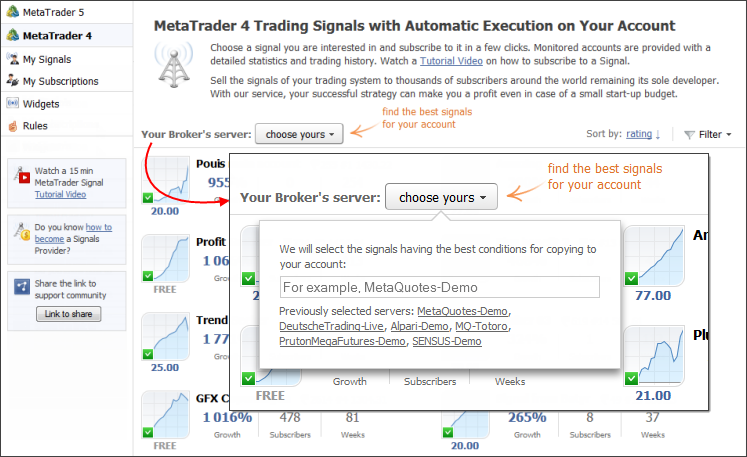
The showcase of signals provides a special function for selecting signals with the most suitable conditions for copying. Users just need to specify the name of the server, on which their trading account is open. The system will pick up signals with the best matching settings of trading instruments and the lowest slippage.
Warning
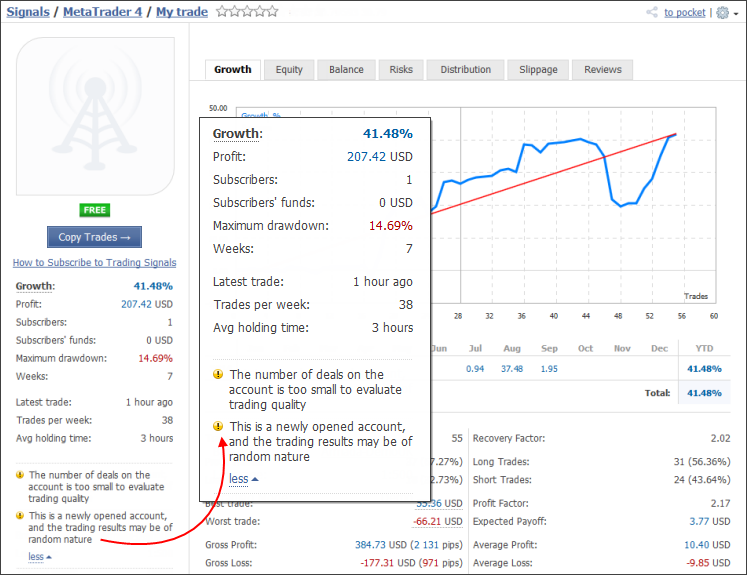
When selecting a signal, make sure to carefully analyze the entire complex of trade reports. Pay attention to the warnings that are displayed on the signal page.
Sorting and Filtering
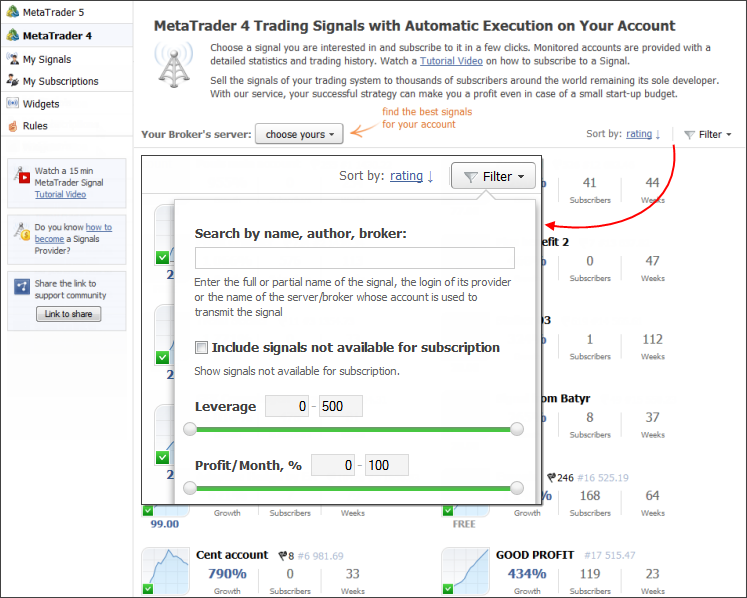
To select signals based on specific criteria, use the sorting and filtering functions.
A Showcase of Signals in MetaTrader and Favorites
Traders can select signals and subscribe to them directly from the MetaTrader 4 and MetaTrader 5 terminals.
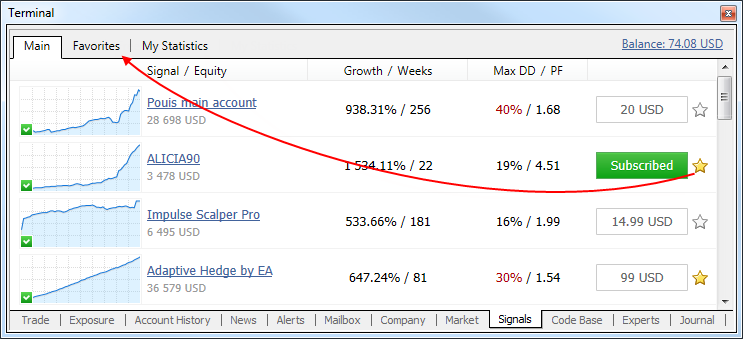
Click on the column headers to sort the signals accordingly - by growth, drawdown, number of subscribers, etc.
A few signals matching the selected criteria can be found on the list. Add them to Favorites, so you can easily get back to them later and evaluate once again. Click on the star on the list or on the signal page, and the selected signal will appear on a separate tab "Favorites".
How to subscribe to a Signal
Subscribing to a signal is easy. Two accounts are needed: a MetaTrader 4 or MetaTrader 5 trading account and an MQL5.community account.
To subscribe to paid signals, enough money should be available on the user's MQL5.community account.
Go to the trading terminal settings and specify the MQL5 account in the "Community" tab:
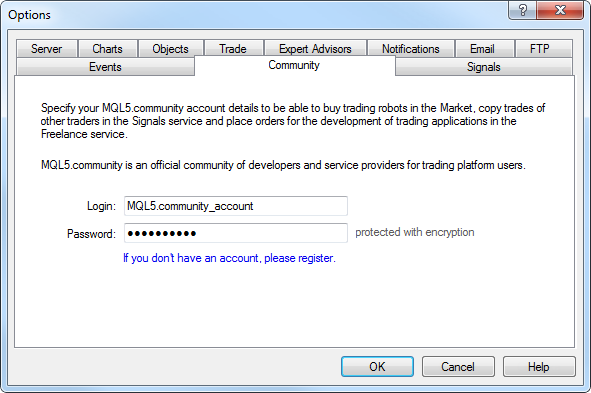
Now you can subscribe to the signal either directly from the trading terminal or on the MQL5.com site.
Subscribing from a Terminal
Select a signal in the Showcase. Subscription can be selected directly in the list or on the signal details page. Click "Subscribe..." and confirm subscription in the appeared window.
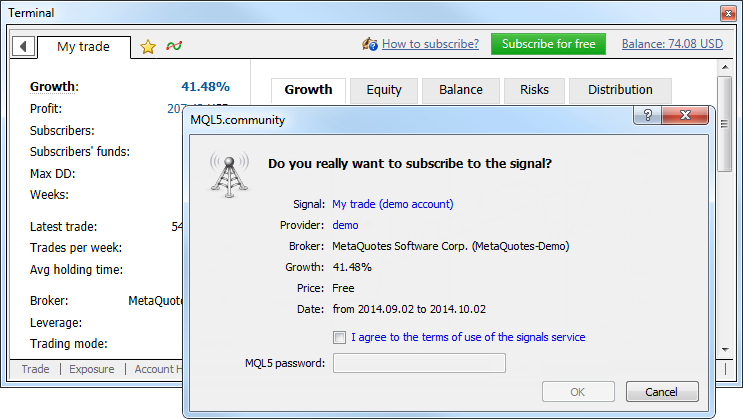
Check all the subscription parameters and pay special attention to the warnings (if any) of mismatching trading conditions. It is recommended to use signals with similar trading conditions.
To continue subscription, agree to the terms of use of the Signals service and specify the MQL5.community password to confirm subscription. After this, a window of copying parameters will open.
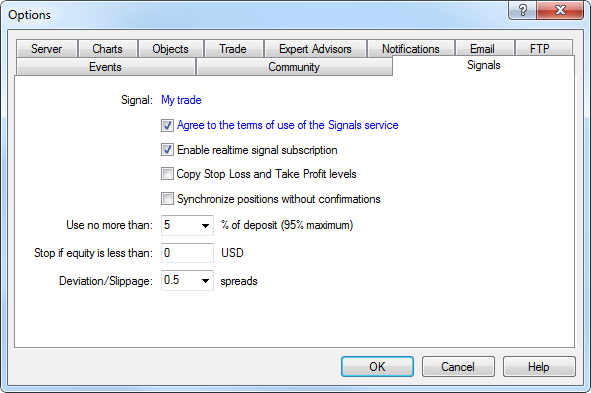
If necessary, change the settings. After a click on "OK" trade copying will start.
How to Subscribe on the Site
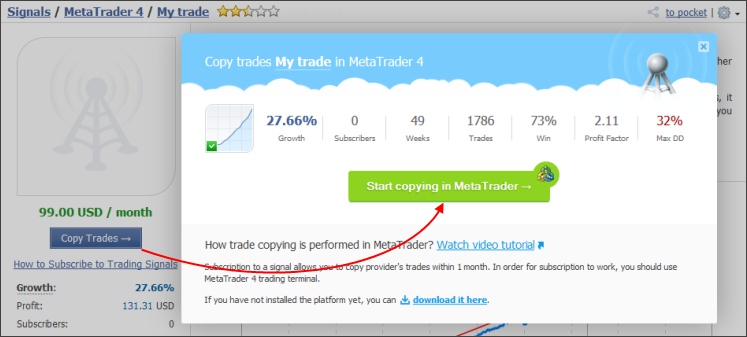
Open the Signal page and click "Subscribe". If the trade platform is not installed on your PC, click "download it here" link in the window that appears. The official MetaTrader 4 or MetaTrader 5 site will open, where the terminal can be downloaded and installed. Otherwise click "Start copying in MetaTrader". The trading terminal will open. The selected signal page will open in the terminal, and the subscription confirmation window will appear. Subscription is completed from the terminal as described above.
- All subscriptions can be managed in the 'My Subscriptions' section.
- With a real account one can subscribe only to a signal based on a real account.
Subscription control
All actions, including Signal operation related ones, are recorded in the terminal Journal. Here are a few examples of important subscription logs. All records associated with the signals begin with the 'Signal' keyword.
The terminal detected a subscription to the "My trade" signal for the JohnSmith account, the subscription expiration date is - 2014.09.28, copying is enabled.
Copying parameters: uses 5% of deposit, no limit on the minimum equity, allowed slippage is 0.5 spread, copying of Stop Loss and Take Profit is disabled.
Signal - money management: use 5% of deposit, equity limit: 0.00 USD, deviation/slippage: 0.5 spreads, copy SL/TP: disabled
The balance and leverage of the subscriber and the signal provider, as well as the copied percentage calculated based on these details. In this case the volume to be copied is 7% of the source one.
Signal - percentage for volume conversion selected according to the ratio of balances and leverages, new value 7% (old value 1%)
Signal - subscriber has balance 4 919.27 USD, leverage 1:100
Signal - signal provider has balance 638.31 USD, leverage 1:500
A warning of mismatch of symbol settings (EURUSD) on the subscriber's and the signal provider's account. In this case, the values of the minimum allowed volume differ: 0.01 and 0.1.
Signal - different specification of symbol EURUSD, signal provider has minimal volume 0.01, subscriber has 0.10
A position on GBPUSD found on the trading account, it is not related to the signal the user is subscribed to. Note that these positions increase the overall load on the account as compared with the signal provider.
Signal - local position [#78109460 buy 0.10 GBPUSD at 1.66023], does not correspond to signal provider
The GBPNZD symbol not found. If the provider trades this symbol, related operations will not be copied on the trader's account.
Signal - symbol GBPNZD not found
The terminal detected a subscription to the "My trade" signal for the JohnSmith account, the subscription expiration date is - 2014.09.28, copying is disabled. Enable copying in the signal settings of the terminal.
Signal - signal subscription disabled, enable realtime subscription in 'Signals' settings
Signal - 'My trade' for 'JohnSmith' subscription found, 2014.09.28 expiration, disabled
Use of the Services on the mql5.com site
The mql5.com website and all the services available on it are owned by MetaQuotes Ltd.
MetaQuotes Ltd is a technology provider and does not provide any financial advise. Users of the service process and transmit all their transactions through their brokers with whom they hold trading accounts. You have agreed that MetaQuotes Ltd is not responsible for any investment decision made by you and indemnifying MetaQuotes Ltd from any direct or indirect liability out of the use of this service.
Conclusion
The Signals service provides maximum convenience and security for all those who want to copy trades of professional traders. All you need to get started is an account in MetaTrader and an MQL5.community account. Connect to the most successful traders and earn money with them.
We also recommend following articles dedicated to signals:
Translated from Russian by MetaQuotes Ltd.
Original article: https://www.mql5.com/ru/articles/523
Warning: All rights to these materials are reserved by MetaQuotes Ltd. Copying or reprinting of these materials in whole or in part is prohibited.

 Statistical Carry Trade Strategy
 Interview with Andrey Barinov (ATC 2012)
 Communicating With MetaTrader 5 Using Named Pipes Without Using DLLs
 Trading Signals in MetaTrader 5: A Better Alternative to PAMM Accounts!

- Free trading apps
- Over 8,000 signals for copying
- Economic news for exploring financial markets
You agree to website policy and terms of use
Have paid for a subscription to the signal. Finding a lot of latency. Want to change live trading account, how do I do it? Or to which email address to apply?
You can move your signal subscription to another trading account once a week, but be careful with the new account details.
https://www.mql5.com/en/signals/subscriptions
Ho pagato un abbonamento per il segnale. Riscontro con molta latenza. Vorrei cambiare conto di trading reale, come posso fare? O a quale indirizzo email devo inviare la richiesta?
Hi Yong Li,
In addition to Eleni's excellent advice, keep in mind that latency is often caused by the geographic distance between the provider's server and your broker's. If the signal strategy you're following is very fast or relies on breakout trades, even a single second of delay can dramatically worsen your entry price compared to the provider's, compromising your results.
If you're not already using it, the ideal solution to this technical issue is to activate the native MQL5 VPS directly from your MetaTrader terminal. This system hosts the platform on a virtual server located as close as possible to your broker's server, reducing latency to almost zero.
Best regards
Can mql detected in auto the suffix?